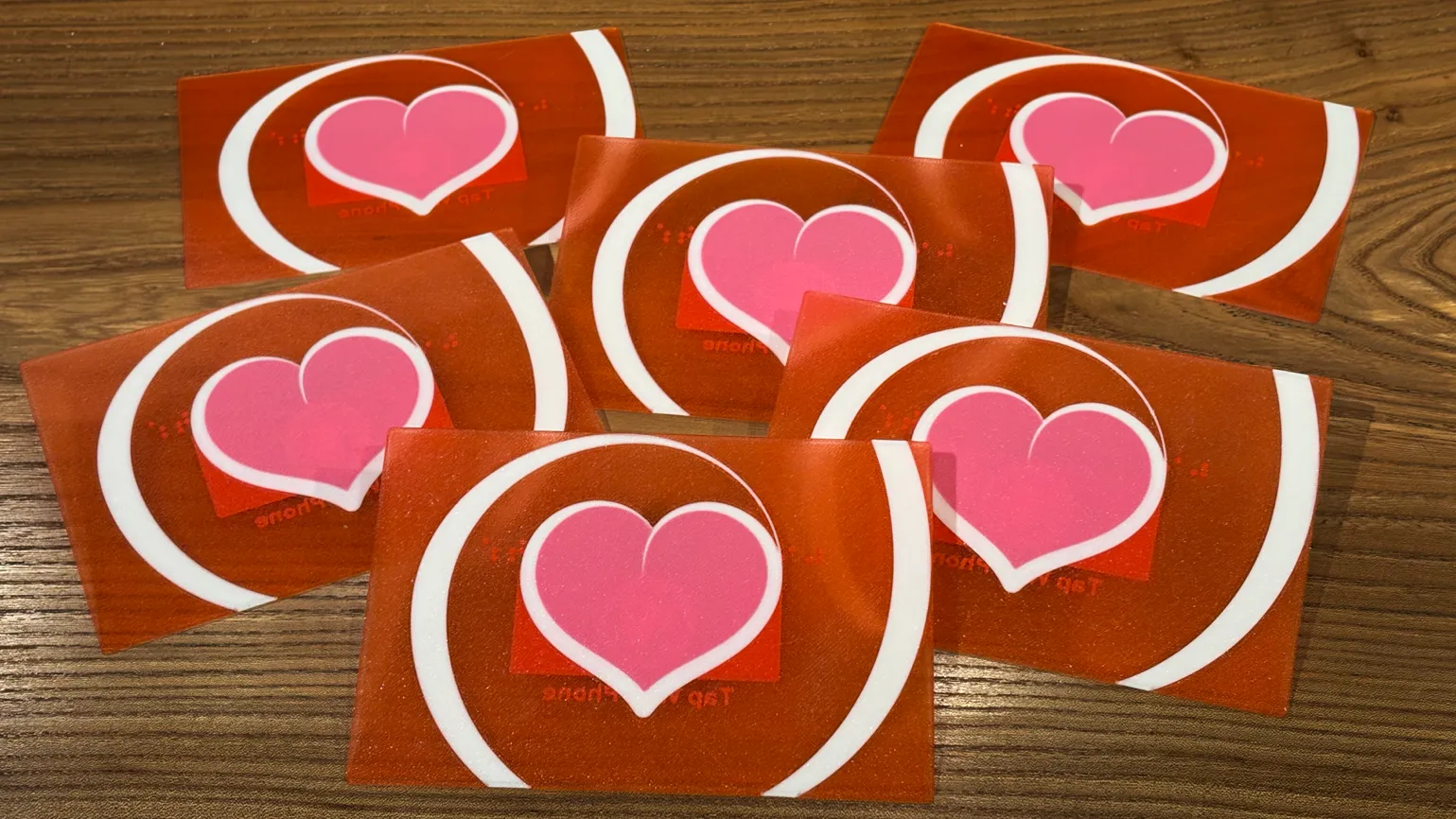
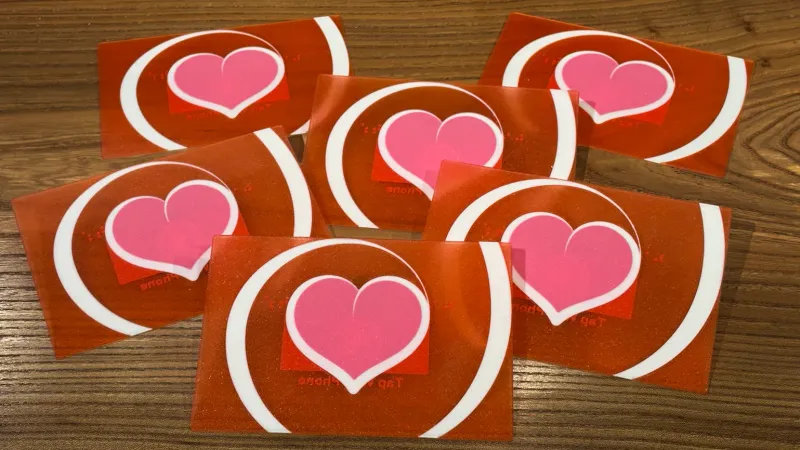
I 3-D printed a Valentine’s Card That Roasts You For Opening It Early
Most Valentine’s cards are dead on arrival. You write something sweet, seal the envelope, hand it over—done. The message is frozen in time, a snapshot of a single moment that can never change.
I wanted to build something that refused to die.
What if a physical card could update itself? What if I could rewrite the message days after handing it over? What if it had enough personality to tell you to fuck off when you tried to peek early?
This is the technical breakdown of the NFC Valentine: a 3D-printed card with embedded NFC tags, context-aware personalization, a choreographed glitch sequence synced to audio cues, and a real-time content management system I control from my phone—complete with push notifications when someone opens it.
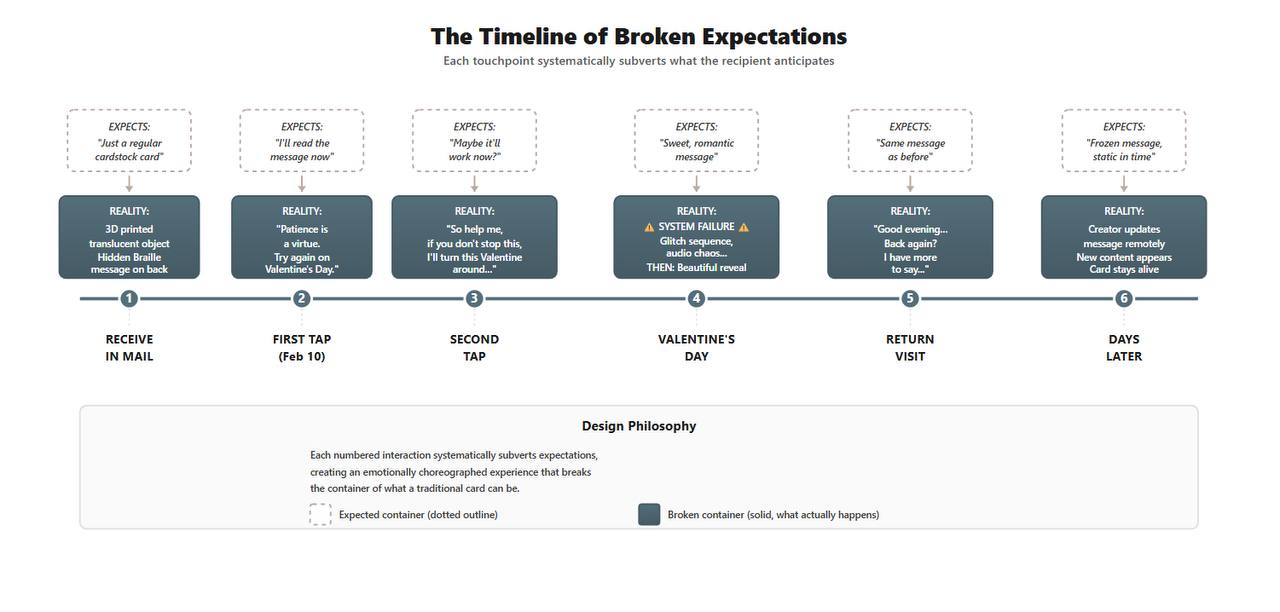 Each touchpoint systematically subverts what the recipient anticipates
The Stack
Physical:
- CAD-designed translucent housing with floating opaque shapes
- Postcard dimensions (5” x 7”) for mail compatibility
- Embedded NFC-215 tags (invisible integration)
- Braille embossing: “Love is blind”
Frontend:
- Vanilla JavaScript (no framework bloat)
- CSS animations choreographed to millisecond precision
- Web Audio API for glitch sound effects
sessionStoragefor visit trackingDate()object for temporal gating
Backend:
- Google Sheets as headless CMS
- Google Apps Script as serverless API
- ntfy.sh for push notifications
- Zero database, zero hosting costs
The whole thing runs on static hosting and updates in real-time. No servers. No monthly fees. Just a spreadsheet, some clever JavaScript, and audacity.
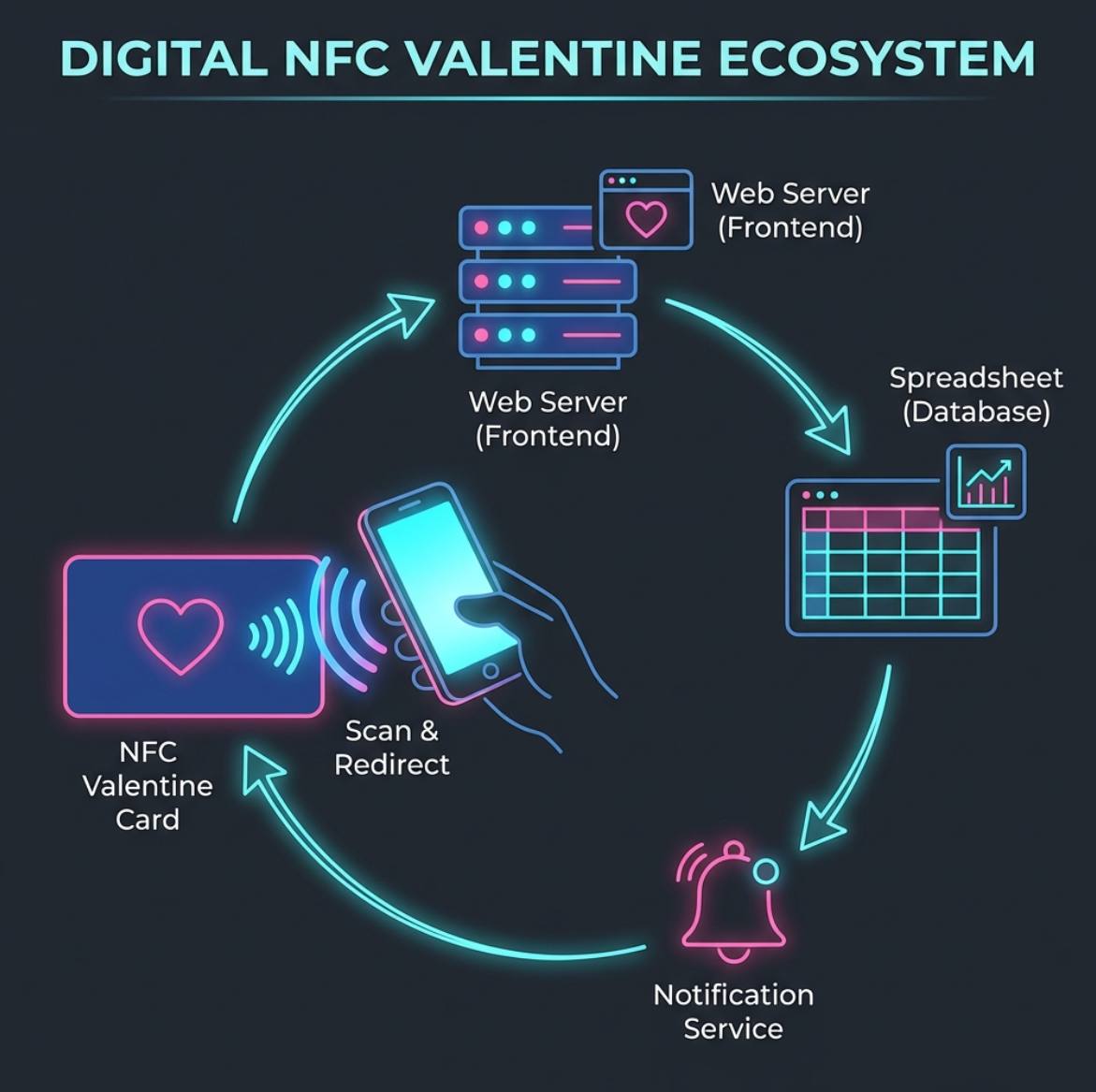 The complete data flow from NFC tap to push notification
Phase 1: The Physical Object Subverts Expectations
Before anyone taps their phone, the card already breaks conventions.
I designed it in Fusion 360 as a layered piece—translucent PLA with opaque shapes that appear to float in a sea of red. The dimensional quality catches light differently depending on viewing angle. It doesn’t look like cardstock. It looks like something between a card and a sculpture.
The thickness serves a purpose: housing the NFC tag invisibly while maintaining postcard dimensions for standard mail.
On the back, there’s Braille: “Love is blind.”
Most people won’t notice. Some will run their fingers over the raised dots and wonder. A few will read it and smile at the layered meaning. Accessibility isn’t an afterthought—it’s part of the narrative.
Phase 2: The Card Has Opinions (And They’re Sassy)
Try to scan it on February 10th? You get this:
Patience is a virtue. Try again on Valentine's Day.Come back an hour later because you’re curious?
Relax. It's not time yet.Try again?
So help me, if you don't stop this, I'll turn this Valentine
around and send it home.
The implementation is dead simple but effective:
const today = new Date();
const vday = new Date(today.getFullYear(), 1, 14); // Feb 14

if (today < vday) {
  const attempts = sessionStorage.getItem('attempts') || 0;
  sessionStorage.setItem('attempts', parseInt(attempts) + 1);

  const responses = [
    "Patience is a virtue. Try again on Valentine's Day.",
    "Relax. It's not time yet.",
    "So help me, if you don't stop this, I'll turn this Valentine around and send it home.",
    "I'm serious. February 14th. Not earlier.",
    "You're really testing my patience here."
  ];

  return responses[Math.min(attempts, responses.length - 1)];
}
The card doesn’t just wait passively. It pushes back. It teases. It makes you earn the reveal.
Phase 3: Context-Aware Personalization
Even after Valentine’s Day unlocks, the card doesn’t show the same message every time.
Time-aware greetings:
const hour = new Date().getHours();
let greeting;

if (hour < 12) {
  greeting = `Good morning, ${name}. Here's something to start your day...`;
} else if (hour < 18) {
  greeting = `Hope your afternoon is going well, ${name}...`;
} else {
  greeting = `As the day winds down, ${name}...`;
}
Visit tracking:
const visitCount = sessionStorage.getItem('visitCount') || 0;
sessionStorage.setItem('visitCount', parseInt(visitCount) + 1);

if (visitCount > 0) {
  return "Back again? I have more to say...";
}
The card knows who you are (via the NFC code), when you’re opening it, and how many times you’ve visited. Every tap is a new interaction.
Phase 4: The Glitch Performance (Peak UX Chaos)
The moment you finally unlock it on Valentine’s Day, the screen doesn’t show love.
It shows chaos.
SYSTEM UNSTABLE...
ATTEMPTING RECOVERY...
⚠️ CRITICAL FAILURE ⚠️
Red terminal text. Screen shakes. Colors strobe. Audio glitches fire in sync: metallic clanks, distortion, the sound of something breaking.
For 4.5 seconds, it feels like you just bricked your phone.
Then the bass drops. The chaos clears. The glitch resolves into something calm and beautiful—the actual message, timed perfectly to the music.
The Technical Challenge: Frame-Perfect Timing
Choreographing DOM manipulation, CSS animations, and audio cues down to the millisecond meant treating audio.currentTime as a metronome:
const audio = new Audio('glitch-sequence.mp3');
audio.play();

const timeline = [
  { time: 0.0, action: () => showText("SYSTEM UNSTABLE...") },
  { time: 1.2, action: () => shakeScreen() },
  { time: 2.1, action: () => showText("ATTEMPTING RECOVERY...") },
  { time: 2.8, action: () => strobeColors() },
  { time: 3.5, action: () => showText("⚠️ CRITICAL FAILURE ⚠️") },
  { time: 3.5, action: () => playGlitchSound() },
  { time: 4.5, action: () => clearChaos() },
  { time: 5.0, action: () => revealMessage() }
];

function tick() {
  const current = audio.currentTime;
  timeline.forEach(event => {
    if (current >= event.time && current < event.time + 0.05) {
      event.action();
    }
  });
  requestAnimationFrame(tick);
}

tick();
Every glitch, every fade, every text reveal had to sync with the beat. It had to feel cinematic, not scripted.
Phase 5: Google Sheets as a Headless CMS
Here’s where it gets interesting.
Most developers would hardcode the messages in the source code. But that makes the card static—just in a different format.
I wanted the card to be a living document. I wanted to update the message after handing over the card.
The solution: Google Sheets as a serverless backend.
The Spreadsheet Structure:
| Code | Name | Message |
|---|---|---|
| A01 | Alice | ”I saw you smile at the coffee shop today” |
| A02 | Bob | ”Your laugh is my favorite sound” |
| A03 | Carol | ”Thanks for always being there” |
The Google Apps Script API:
function doGet(e) {
  const code = e.parameter.code;
  const sheet = SpreadsheetApp.openById('YOUR_SHEET_ID').getActiveSheet();
  const data = sheet.getDataRange().getValues();

  for (let i = 1; i < data.length; i++) {
    if (data[i][0] === code) {
      // Log the access
      logAccess(code, data[i][1]);

      // Return the message
      return ContentService.createTextOutput(JSON.stringify({
        name: data[i][1],
        message: data[i][2]
      })).setMimeType(ContentService.MimeType.JSON);
    }
  }

  return ContentService.createTextOutput(JSON.stringify({
    error: "Invalid code"
  })).setMimeType(ContentService.MimeType.JSON);
}
The Frontend Fetch:
const code = new URLSearchParams(window.location.search).get('code');
const response = await fetch(`YOUR_APPS_SCRIPT_URL?code=${code}`);
const data = await response.json();
The result: I can hand you a card on February 10th with a placeholder message, then open the Google Sheets app on my phone at 11:59 PM on Valentine’s Day and type:
“I saw you smile at the coffee shop today.”
The next time you scan, that new message appears.
The card isn’t done when I give it to you. It’s a channel I can keep writing through.
Phase 6: The Feedback Loop (Push Notifications)
The final layer most people never see: I know when you open it.
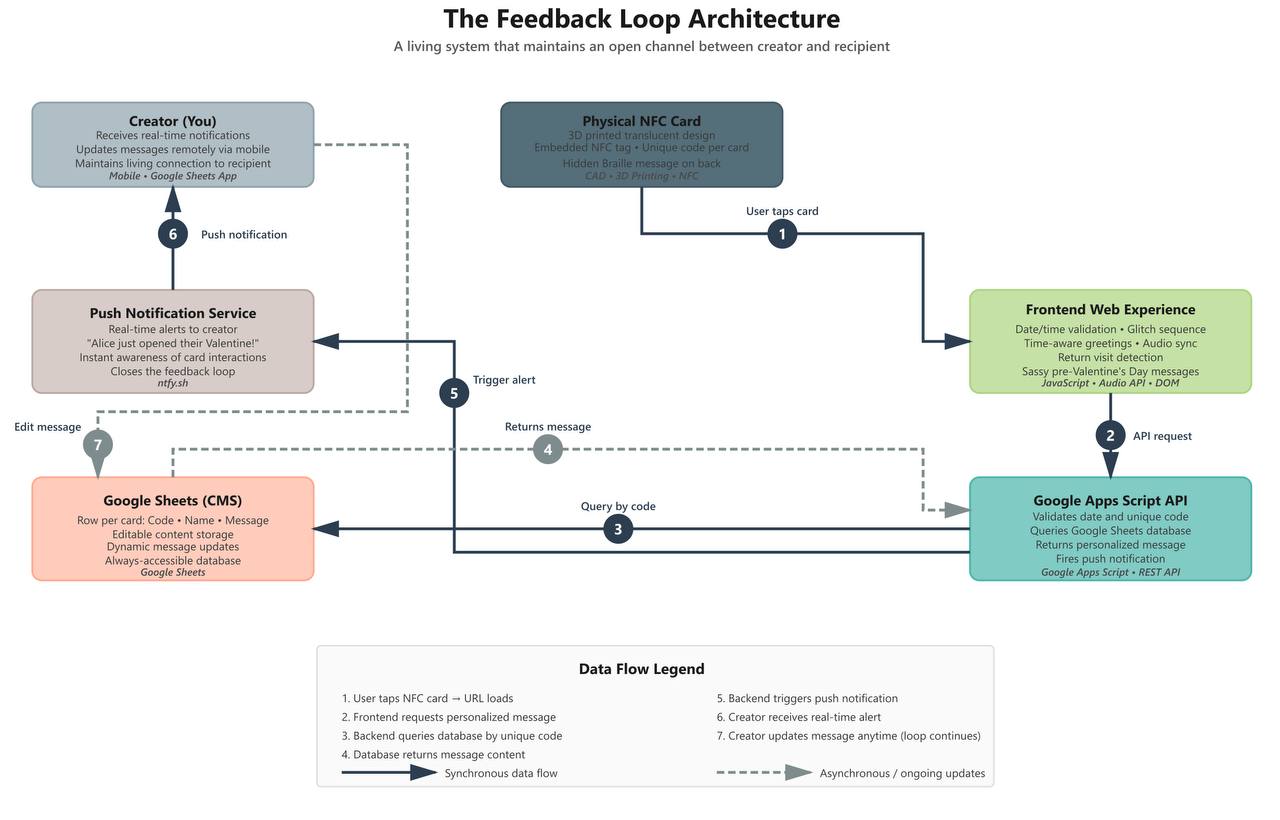 A living system that maintains an open channel between creator and recipient
Integrated into the Google Apps Script is a call to ntfy.sh, a dead-simple notification service:
function logAccess(code, name) {
  const message = `${name} just opened their Valentine!`;

  UrlFetchApp.fetch('https://ntfy.sh/YOUR_TOPIC', {
    method: 'post',
    headers: { 'Title': 'Valentine Opened!' },
    payload: message
  });
}
Buzz. My phone lights up:
Alice just opened their Valentine!
Not invasive. Not tracking. Just a momentary awareness that the connection happened.
It closes the loop. The card isn’t just me broadcasting—it creates a feedback channel. I send a gift, and I get a quiet signal back when it’s received.
The Architecture: How It All Connects
The beauty of this system is how simple components create complex behavior:
The 7-Step Data Flow:
- User taps NFC card → URL loads with unique code parameter
- Frontend validates date/time → serves appropriate response
- Frontend requests personalized message via fetch()
- Google Apps Script receives code → queries spreadsheet
- Backend triggers ntfy.sh push notification
- Creator receives real-time alert on mobile
- Creator updates message in Google Sheets → loop continues
Every layer serves multiple purposes:
- Google Sheets isn’t just storage—it’s a mobile-accessible CMS
- Apps Script isn’t just an API—it’s the notification trigger
- The frontend isn’t just display—it’s the personality engine
- NFC isn’t just a link—it’s the physical-digital bridge
The system is serverless, stateless, and costs nothing to operate after initial materials (~$15 for NFC tags, ~$5 for PLA filament).
The Result: A New Design Space
To the recipient, it looks like magic:
- They receive something beautiful and strange in the mail
- They discover the Braille on the back
- They tap their phone on February 10th and get scolded
- They tap again and get a dad-joke-level threat
- They come back on February 14th in the morning
- The screen loses its mind for 4.5 seconds
- A personalized greeting appears that knows it’s morning
- They visit again in the evening—different message
- They come back days later—new message I wrote from my phone
To me, it’s proof that the boundary between physical and digital isn’t a wall—it’s a design space.
Why This Matters
We’re entering an era where physical objects don’t have to be static. NFC is standard on every phone now. APIs are everywhere. The tools to make real-world things “smart” are no longer expensive or complicated.
They’re just waiting for someone to think differently about what “a card” can do.
I didn’t just digitize a Valentine. I built a new paradigm for physical gifts—one that:
- Has personality and timing
- Stays open as a communication channel
- Adapts to context
- Can be updated remotely
- Provides bidirectional feedback
And the entire stack costs $0/month to run.
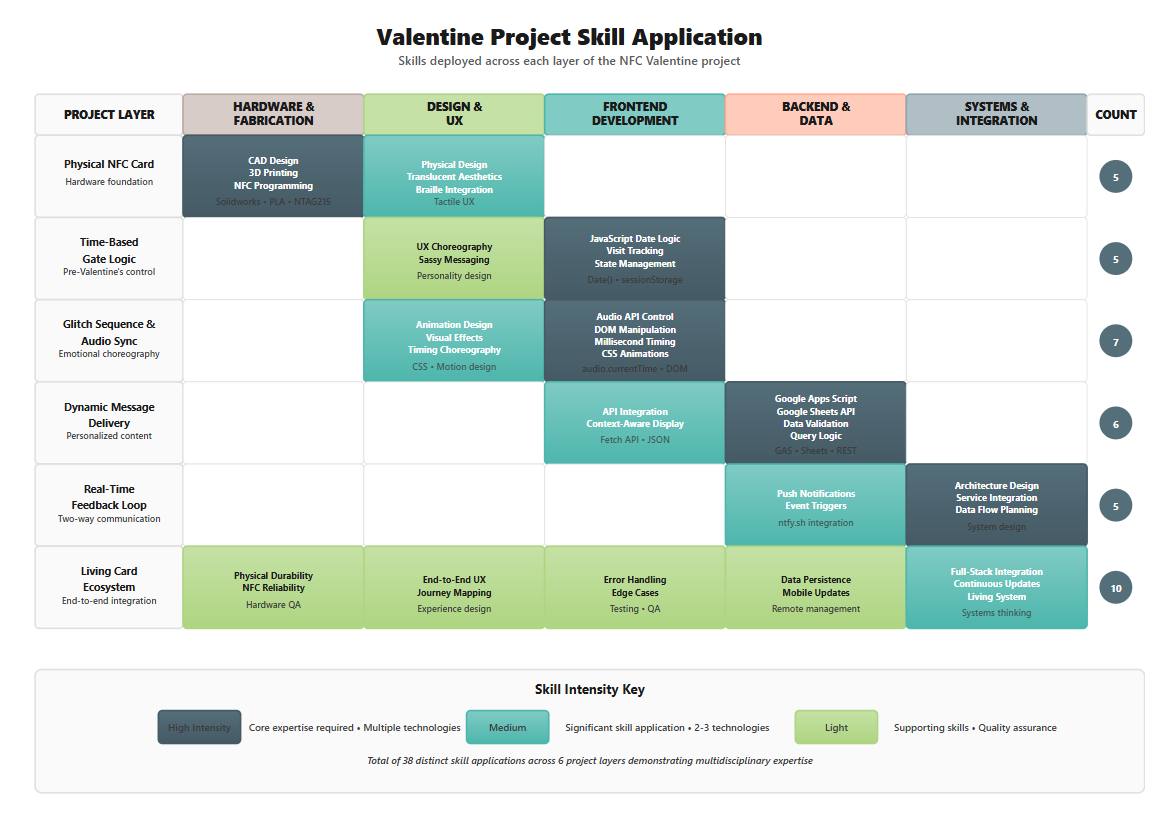 38 distinct skill applications across 6 project layers demonstrating multidisciplinary expertise
The Code
Want to build something that refuses to stay static?
The full source code, CAD files, and Google Apps Script are on my GitHub: github.com/chromaglow/Valentines-day-fun
Let’s talk about what else we can make come alive.
Tech Stack Summary:
- Physical: CAD, 3D printing, NFC-215 tags, Braille embossing
- Frontend: Vanilla JS, Web Audio API, CSS animations, DOM choreography
- Backend: Google Sheets, Google Apps Script, ntfy.sh
- Hosting: Static (GitHub Pages, Netlify, etc.)
- Cost: $0/month (after initial materials)
Future Improvements:
- E-ink display integration for persistent visual updates
- Haptic feedback via NFC-enabled devices
- Geofencing for location-aware messages
- Multi-recipient group cards with shared state
- End-to-end encryption for private messages
Reference Images